颜色
GDI+中用Color结构定义绘图工具的颜色。下面的代码定义一个蓝色对象c::
【VB.NET】
code.vb.net
Dim c As Color = Color.Blue【VC#.NET】
code.vc#.net
Color c=Color.Blue;采用这种定义方式,可以定义标准颜色。所谓标准颜色,是系统已经配好的颜色,具有各自的名称。利用Color结构的FromArgb方法,可以自定义任何颜色。
【VB.NET】
code.vb.net
Dim c2, c3 As Color
c2.FromArgb(255,0,0)
c3.FromArgb(200,0,0,255)
【VC#.NET】
code.vc#.net
Color c2,c3;
c2.FromArgb(255,0,0)
c3.FromArgb(200,0,0,255);
上面代码中,2定义为红色,3定义为蓝色,且Alpha组分值为200。Alpha定义颜色的透明度,将在后面介绍。
画笔
常用Pen类定义画笔。下面的代码定义一支绿色画笔和一支宽度为2的红色画笔。
【VB.NET]
code.vb.net
Dim p1 As New Pen(Color.Green)
Dim p2 As New Pen(Color.Red, 2)
【VC#.NET】
code.vc#.net
Pen p1=new Pen(Color.Green);
Pen p2=new Pen(color.red,2);
与标不颜色相对应,GDI+提供了若干标准颜色的画笔。标准颜色的画笔用Pens类定义,如:
【VB.NET]
code.vb.net
Dim p As Pen = Pens.BlueViolet【VC#.NET]
code.vc#.net
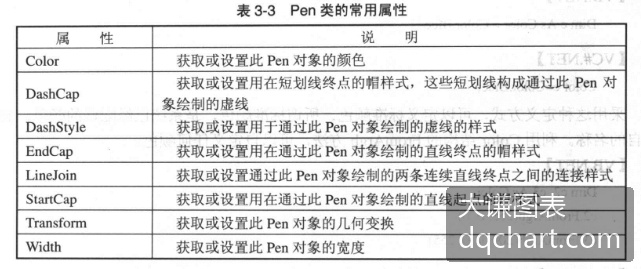
Pen p= Pens.BlueViolet;通过设置画笔对象的属性,可以定义画笔的颜色、宽度、线条的线型、起点和终点的形状等。Pen类的常用属性如表3-3所示。
表3-3 Pen类的常用属性
\[\]
线条绘制示例
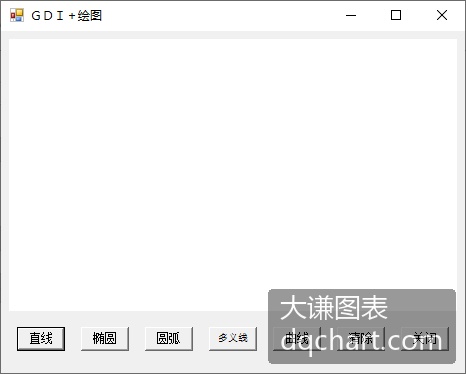
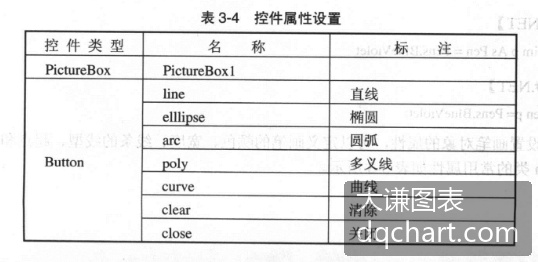
面举一个画线的例子。该例实现在图片框中绘制直线段、圆、圆弧、多义线、贝塞尔曲线和基数样条曲线。如图3-2所示,进入编程环境以后,在窗体上放置一个图片框和7个命令按钮,各控件的属性设置如表3-4所示。
\[\]
图3-2
表3-4控件属性设置
\[\]
程序界面设计完毕以后,在Form1类的代码框架中添加下面的代码:
【VB.NET】
code.vb.net
Private g As Graphics
Private Sub line_Click(ByVal sender As System.Object, _
                ByVal text-blue-400">e As System.EventArgs) Handles line.text-blue-400">Click
    g = PictureBox1.CreateGraphics()
    Dim penl As New Pen(Color.Blue,3)
    penl.DashStyle = Drawing.Drawing2D.DashStyle.DashDot
    g.DrawLine(pen1, 10, 10, 200,200)
    Dim pen2 As New Pen(Color.Red)
    pen2.EndCap = Drawing.Drawing2D.LineCap.ArrowAnchor
    g.DrawLine(pen2, 200, 50,20,150)
End Sub
Private Sub ellipse_Click(ByVal sender As System.Object, _
            ByVal text-blue-400">e As System.EventArgs) Handles ellipse.text-blue-400">Click
    g= PictureBox1.CreateGraphics()
    g.DrawEllipse(Pens.Red, 30,50,300, 200)
End Sub
Private Sub arc_Click(ByVal sender As System.Object, _
            ByVal text-blue-400">e As System.EventArgs) Handles arc.text-blue-400">Click
    g= PictureBox1.CreateGraphics()
    Dim pen As New Pen(Color.FromArgb(100, 200,0,200),2)
    g.DrawArc(pen,100, 40,100,100,30,290)
End Sub
Private Sub poly_Click(ByVal sender As System.Object, _
            ByVal text-blue-400">e As System.EventArgs) Handles poly.text-blue-400">Click
    g = PictureBox1.CreateGraphics()
    Dim points() As PointF = New PointF(){ _
            New PointF(90, 10), New PointF(300,100),
            New PointF(150, 200), New PointF(100,80))
    g.DrawPolygon(Pens.BlueViolet, points)
End Sub
Private Sub curve_Click(ByVal sender As System.Object, _
            ByVal text-blue-400">e As System.EventArgs) Handles curve.text-blue-400">Click
    g= PictureBox1.CreateGraphics()
    Dim pen As New Pen(Color.Cyan, 2)
    pen.DashStyle = Drawing.Drawing2D.DashStyle.DashDotDot
    g.DrawBezier(pen, New PointF(90, 10), New PointF(300,100), _
            New PointF(150, 200), New PointF(100,80))
    Dim points() As PointF = New PointF(){ _
            New PointF(90, 10), New PointF(300,100), _
            New PointF(150, 200), New PointF(100,80)}
    g.DrawCurve(Pens. Blue, points)
End Sub
Private Sub clear_Click(ByVal sender As System.Object, _
            ByVal text-blue-400">e As System.EventArgs) Handles clear.text-blue-400">Click
    g= PictureBox1.CreateGraphics()
    g.Clear(Color.White)
End Sub
Private Sub close_Click(ByVal sender As System.Object, _
            ByVal text-blue-400">e As System.EventArgs) Handles close.text-blue-400">Click
    Me.Dispose()
End Sub
【VC#.NET]
code.vc#.net
private Graphics g;
private void line_Click(object sender, System.EventArgs e)
{
    g= pictureBox1.CreateGraphics();
    Pen pen1=new Pen(Color.Blue, 3);
    pen1.DashStyle = DashStyle.DashDot;
    g.DrawLine(pen1,10, 10,200,200);
    Pen pen2=new Pen(Color.Red);
    pen2.EndCap = LineCap.ArrowAnchor;
    g.DrawLine(pen2, 200,50, 20,150);
}
private void ellipse_Click(object sender, System.EventArgs e)
{
    g = pictureBox1.CreateGraphics();
    g.DrawEllipse(Pens.Red, 30, 50,300,200);
}
private void arc_Click(object sender, System.EventArgs e)
{
    g= pictureBox1.CreateGraphics();
    Pen pen=new Pen(Color.FromArgb(100, 200,0,200), 2);
    g.DrawArc(pen,100,40,100,100,30,290)
}
private void poly_Click(object sender, System.EventArgs e)
{
    g= pictureBox1.CreateGraphics();
    PointF[] points= new PointF[] {
    new PointF(90,10),new PointF(300,100),
    new PointF(150,200),new PointF(100,80)};
    g.DrawPolygon(Pens.BlueViolet, points);
}
private void curve_Click(object sender, System.EventArgs e)
{
    g= pictureBox1.CreateGraphics();
    Pen pen=new Pen(Color.Cyan, 2);
    pen.DashStyle =DashStyle.DashDotDot;
    g.DrawBezier(pen,new PointF(90, 10),new PointF(300,100),
    new PointF(150,200),new PointF(100,80));
    PointF[] points = new PointF[] {
    new PointF(90,10),new PointF(300,100),
    new PointF(150, 200),new PointF(100,80)};
    g.DrawCurve(Pens.Blue, points);
}
private void clear_Click(object sender, System.EventArgs e)
{
    g= pictureBox1.CreateGraphics();
    g.Clear(Color.White);
}
private void close_Click(object sender, System.EventArgs e)
{
    this.Dispose();
}
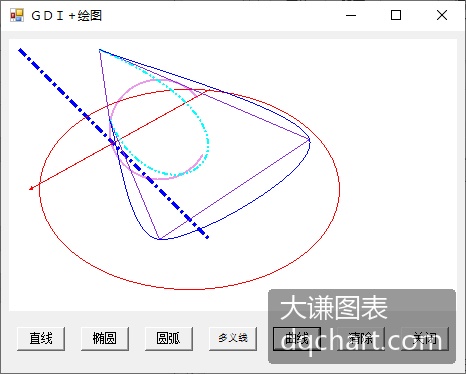
运行程序,绘图效果如图3-3所示。
\[\]
图3-3线条绘制效果