走样是指绘制线条、文本时,出现的锯齿现象。反走样则是通过一定的算法来消除这些锯齿,或者说使这些锯齿显得不那么明显。GDI+中,将Graphcis对象的SmoothingMode属性设置为 AntiAlias可以改善图形的显示效果。
下面的例子比较了反走样前后图形和文本的显示效果。
【VB.NET】
code.vb.net
Protected Overrides Sub OnPaint(ByVal text-blue-400">e As System.Windows.Forms.PaintEventArgs)
     Dim g As Graphics = text-blue-400">e.Graphics
     '放大8倍
     g.ScaleTransform(8,8)
     '绘制没有反走样效果的图形和文字
     Draw(g)
     '设置反走样
     g.SmoothingMode = SmoothingMode.AntiAlias
     '向右平移40,绘制有反走样效果的图形和文字
     g.Translate Transform(40,0)
     Draw(g)
End Sub
Private Sub Draw(ByVal g As Graphics)
     '绘一条直线段、一个椭圆和一字符串
     g.DrawLine(Pens.Gray, 10, 10,40,20)
     g.DrawEllipse(Pens.Gray, 20, 20, 30,10)
     Dim s As String="反走样测试"
     Dim font As New Font("宋体",5)
     Dim brush As New SolidBrush(Color.Gray)
     g.DrawString(s, font, brush, 10,40)
End Sub
【VC#.NET]
code.vc#.net
protected override void OnPaint(PaintEventArgs e)
{
     Graphics g= e.Graphics;
     //放大8倍
     g.ScaleTransform(8,8);
     //绘制没有反走样效果的图形和文字
     Draw(g);
     //设置反走样
     g.SmoothingMode = SmoothingMode.AntiAlias;
     //向右平移40,绘制有反走样效果的图形和文字
     g. Translate Transform(40,0);
     Draw(g);"
}
private void Draw(Graphics g)
{
     //绘一条直线段、一个椭圆和一字符串
     g.DrawLine(Pens.Gray, 10, 10,40,20);
     g.DrawElipse(Pens.Gray, 20, 20,30,10);
     string s="反走样测试";
     Font font=new Font("宋体",5);
     SolidBrush brush=new SolidBrush(Color.Gray);
     g.DrawString(s,font, brush, 10,40);
}
程序运行结果如图3-15所示。
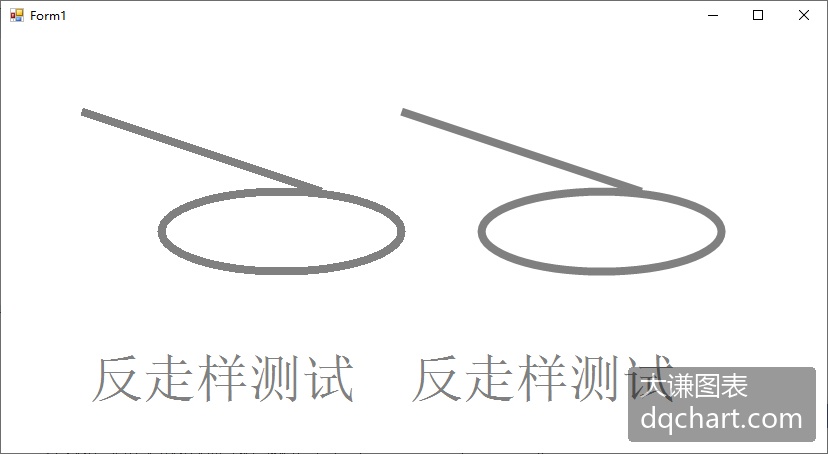
\[\]
图3-15 反走样效果测试