FontFamily类
FontFamily类定义有着相似的基本设计但在形 上有某些差异的一组字样。下面的语句定义一个字体名称为"宋体"的FontFamily类实例。
【VB.NET】
Dim ff As New FontFamily("宋体")【VC#.NET]
FontFamily ff=new FontFamily("宋体");如果不是使用默认字体,或者不是从其他字体创建新字体,则大多数情况下需要创建FontFamily类对象,并与Font类一起使用来定义新字体。
Font类
Font 类定义特定的文本格式,包括字体、字号和字形属性。如上面定义了FontFamily类实例ff,下面使用它创建两个Font对象:
【VB.NET】
Dim f1 As New Font(ff, 20)
Dim f2 As New Font(ff, 20, FontStyle.Bold)
【VC#.NET】
Font f1=new Font(ff, 20);
Font f2=new Font(ff, 20, FontStyle.Bold);
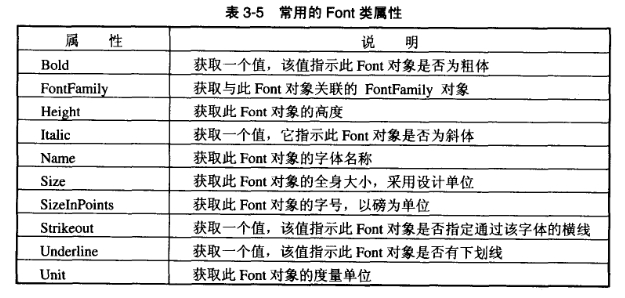
调用Font类的属性,可以获取字体的名称、度量单位、大小和样式等信息。常用的Font类属性如表3-5所示。
表3-5常用的Font类属性
StringFormat 类
StringFormat类可以设置文本对齐方式和行距等。下面指定文本格式为行对中,按列显示。
【VB.NET】
Dim sf As New StringFormat()
sf.LineAlignment = StringAlignment.Center
sf.FormatFlags = StringFormatFlags.Direction Vertical"
【VC#.NET]
StringFormat sf=new StringFormat();
sf.LineAlignment = StringAlignment.Center
sf.FormatFlags = StringFormatFlags.Direction Vertical;
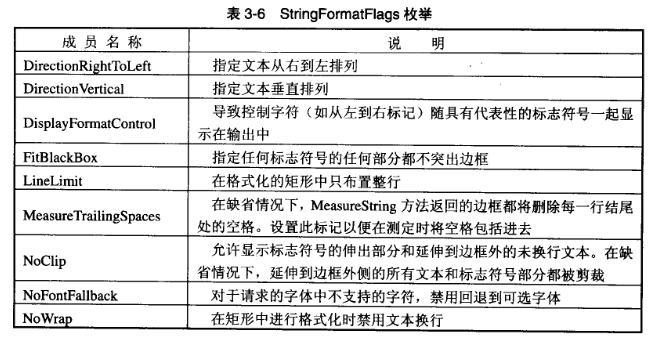
上面代码中,sf的FormatFlags属性设置为一个StringFormatFlags枚举值。StringFormatFlags枚举值指示文本的显示和布局信息,其成员和说明如表3-6所示
表3-6 StringFormatFlags枚举
刷子
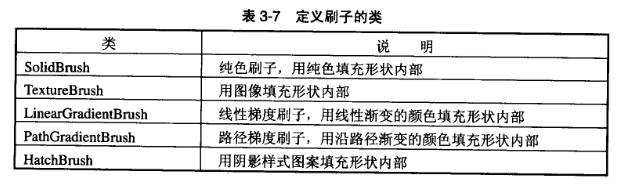
注意,GDI+里面,文字是用刷子刷的,而不是用笔写的。使用Brushes类可以定义标准颜色的刷子,其使用方法与Pens类相似。除了Brushes类,GDI+还提供了表3-7所示的5个类。利用这5个类,可以定义纯色刷子、图像刷子、线性梯度刷子、路径梯度刷子和阴影刷子。
表3-7定义刷子的类
下面的代码创建一把纯色刷子。
【VB.NET】
Dim brush As New SolidBrush(Color.Blue)【VC#.NET】
SolidBrush brush=new SolidBrush(Color.Blue);DrawString方法
利用前面介绍的几个类,可以设置文本的字体、显示格式和绘制工具。具体绘制文本时需要用到Graphics类的DrawString方法。该方法具有下面一些重载:
Public Sub DrawString(String,Font, Brush,PointF)
Public Sub DrawString(String, Font,Brush, PointF,StringFormat)
Public Sub DrawString(String,Font,Brush,RectangleF,StringFormnat)
Public Sub DrawString(String, Fon, Brush, Single, Single)
Public Sub DrawString(String,Font, Brush,Single,Single,StringFormat
下面的例子在前面示例定义的基础上调用Graphics对象g的DrawString方法,在窗体上(100,100)的位置绘制字符串"你好!"。
【VB.NET】
Dim s As String="你好!"
g.DrawString(s,f2, brush, 100,100)
【VC#.NET】
String s="你好!";
g.DrawString(s, f2, brush, 100,100);
文本绘制示例
下面的例子将一首十六字令竖排显示在指定的矩形框中。字体为华文新魏体,蓝色。
【VB.NET】
Protected Overrides Sub OnPain(ByVale As System.Windows.Forms.Pain EventArgs)
     Dim g As Graphics =text-blue-400">e.Graphics
     g.FillRectangle(Brushes.White, Me.ClientRectangle)
     Dim s As String="离天三尺三        惊回首          " _
            &"快马加鞭未下鞍  山"
     Dim fm As New FontFamily("华文新魏")
     Dim f As New Font(fm, _
         20, FontStyle.Bold, _
         GraphicsUnit.Point)
     Dim rectF As New RectangleF(30, 20, 180, 205)
     Dim sf As New StringFormat()
     Dim sbrush As New SolidBrush(Color.FromArgb(255, 0,0,255))
     sf.LineAlignment = StringAlignment.Center
     sf.FormatFlags = StringFormatFlags.Direction Vertical
     g.DrawString(s,f, sbrush, rectF, sf)
End Sub"
【VC#.NET】
protected override void OnPaint(PaintEventArgs e)
{
     Graphics g= e.Graphics;
     g.FillRectangle(Brushes.White, this.ClientRectangle);
     string="离天三尺三        惊回首          "
            + "快马加鞭未下鞍  山";
     FontFamily fm=new FontFamily("华文新魏");
     Font f =new Font(fm,
          20, FontStyle.Bold,
          GraphicsUnit.Point);
     RectangleF rectF= new RectangleF(30, 20,180,205);
     StringFormat sf=new StringFormat();
     SoldBrush sbrush=new SolidBrush(Color.FromArgb(255,0,0, 255));
     sf.LineAlignment = StringAlignment.Center;
     sf.FormnatFlags = StringFormatFlags.Direction.Vertical;
     g.DrawString(s,f, sbrush,rectF,sf);
}
程序运行结果如图3-5所示。
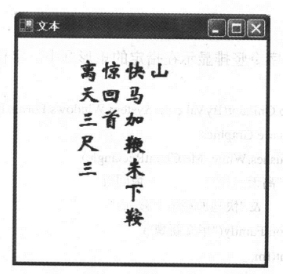
图3-5文本绘制