道路有直有曲,有坦途也有羊肠小道。如果把一组线形几何图形比做一个路线图的话,那么\"路径\"这个词用来表示这组线形图是恰当的。路径中可以有直线段、圆、圆弧或者曲线,它们按顺序组合,可以相连,也可以不相连。在GDI+中,路径由GraphicsPath 类定义。
GraphicsPath 类
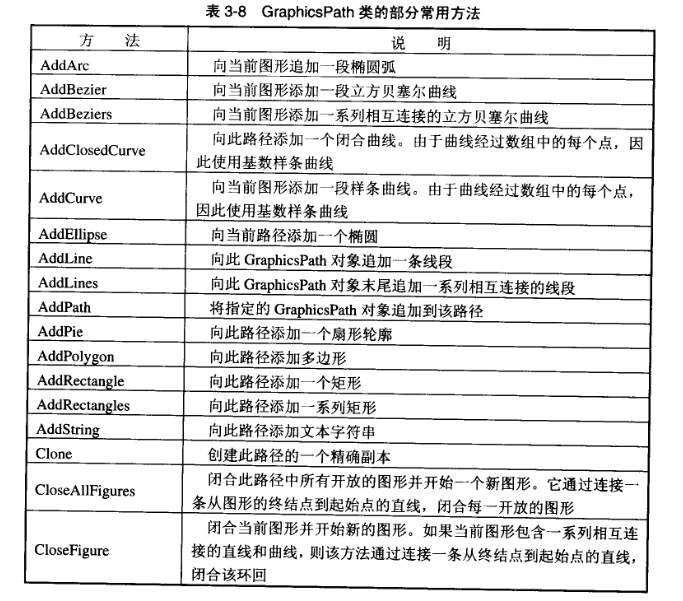
GraphicsPath 类提供了一系列属性和方法。利用它们,可以获取路径上的关键点,可以添加直线段、圆等几何元素,可以获取包围矩形,进行拾取测试等。GraphicsPath类的部分常用方法如表3-8所示。
表3-8 GraphicsPath类的部分常用方法
\[\]
下面的代码创建一个GraphicsPath 类实例,然后添加一个矩形到路径中。
【VB.NET】
code.vb.net
Dim gp As New GraphicsPath()
gp.AddRectangle(New Rectangle(10,10,100,100)).
【VC#.NET】
code.vc#.net
GraphicsPath gp=new GraphicsPath();
gp.AddRectangle(new Rectangle(10,10, 100,100));
注意,创建GraphicsPath类实例,需要导入System.Drawing.Drawing2D名称空间。即在代码窗口顶部加入下面的声明::
【VB.NET】
code.vb.net
Imports System.Drawing.Drawing2D【VC#.NET】
code.vc#.net
using System.Drawing.Drawing2D;另外,路径不再使用后,需要删除,即:
【VB.NET】
code.vb.net
gp.Dispose()【VC#.NET】
code.vc#.net
gp.Dispose();绘制和填充路径
定义路径以后,调用Graphics类的DrawPath方法和FillPath方法可以绘制和填充路径。下面把3.4.1节定义的路径绘制到窗体,然后平移后进行填充。其中,g为Graphic类实例。
【VB.NET】
code.vb.net
g.DrawPath(Pens.Blue, gp)
g.Translate Transform(200,0)
g.FillPath(Brushes.GreenYellow, gp)
【VC#.NET】
code.vc#.net
g.DrawPath(Pens.Blue, gp);
g.Translate Transform(200,0);
g.FillPath(Brushes.GreenYellow, gp);
路径定义示例
下面结合一个实例来介绍路径的定义和绘制。首先创建一条路径,然后在路径中先后添加椭圆、饼形和矩形各一个,最后在窗体上绘制路径并且平移后填充路径。
【VB.NET】]
code.vb.net
Protected Overrides Sub OnPaint(ByVal text-blue-400">e As PaintEventArgs)
     Dim g As Graphics = text-blue-400">e.Graphics
     g.FillRectangle(Brushes.White, Me.ClientRectangle)
     Dim gp As New GraphicsPath()
     gp.AddEllipse(20, 20,300,200)
     gp.AddPie(50, 100,300,100,45,200)
     gp.AddRectangle(New Rectangle(100,30,100,80))
     g.DrawPath(Pens.Blue, gp)
     g.TranslateTransform(200, 20)"
     g.FillPath(Brushes. GreenYellow, gp) gp.Dispose)
End Sub
[VC#.NET]
code.vc#.net
protected override void OnPaint(PaintEventArgs e)
{
     Graphics g=e.Graphics;
     g.FillRectangle(Brushes.White,this.ClientRectangle);
     GraphicsPath gp=new GraphicsPath();
     gp.AddEllipse(20, 20, 300, 200);
     gp.AddPie(50, 100, 300, 100,45, 200);
     gp.AddRectangle(new Rectangle(100, 30, 100, 80));
     g.DrawPath(Pens.Blue, gp);
     g.TranslateTransform(200, 20);
     g.FillPath(Brushes. GreenYellow, gp);
     gp.Dispose();
}
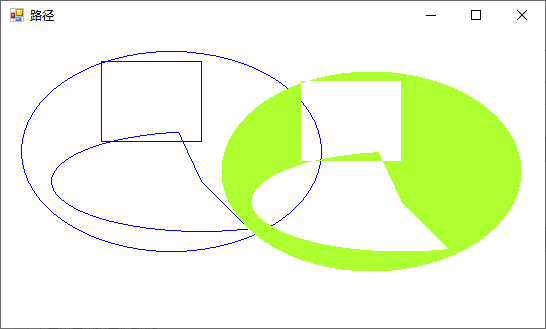
程序运行结果如图3-6所示。
\[\]
图3-6路径绘制和填充