热力图根据矩阵元素数据的大小与指定的颜色查找表建立映射关系,并对各单元进行索引着色。常见的热力图包括普通热力图、圆圈热力图、方块热力图和三角形方块热力图等多种类型。[大谦Excel,dqexcel点com]
普通热力图
热力图常用于矩阵数据的可视化,如图4-28所示。热力图用一个方块表示矩阵中的一个元素。将矩阵数据与颜色查找表之间建立映射关系,将数据的最小值对应色条中的最下端的红色,将最大值对应色条中最上端的黄色,中间的值通过线性插值得到颜色并绘制对应的方块,就得到热力图。
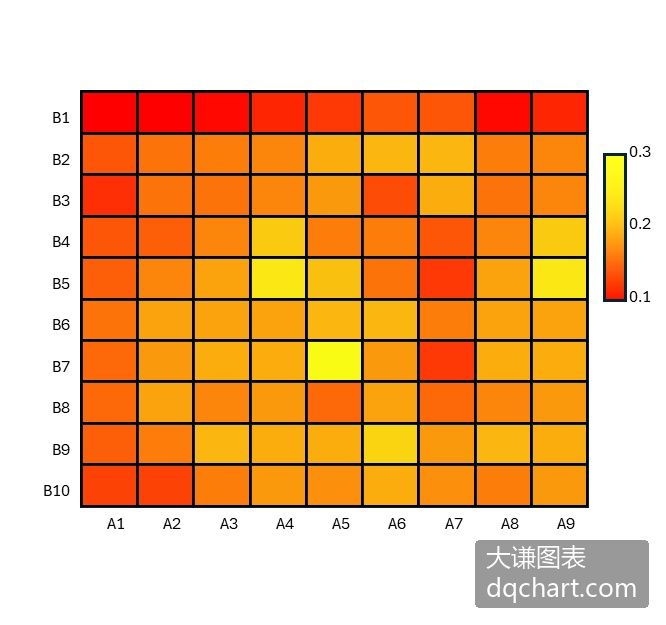
图4-28 热力图
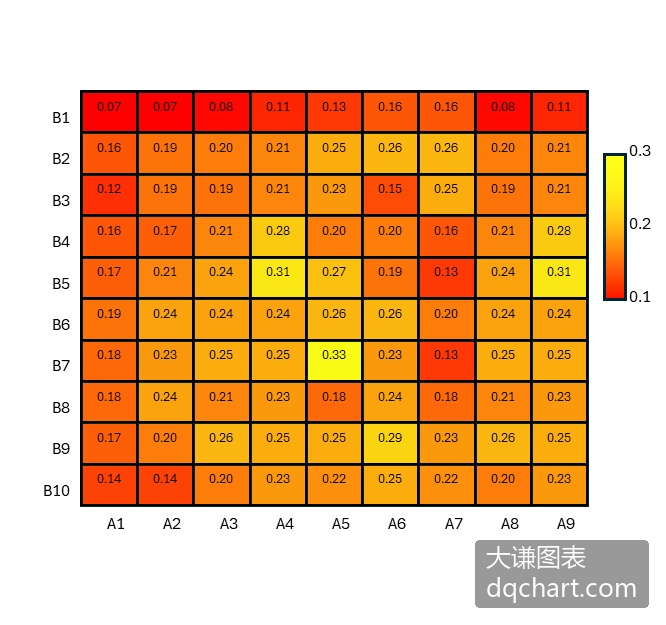
图4-29 给热力图添加数据标签
将公式修改为:=heatmap(A1:J11,,,,,,,,2,TRUE),回车,给热力图添加数据标签并设置颜色查找表为第2种,效果如图4-30所示。
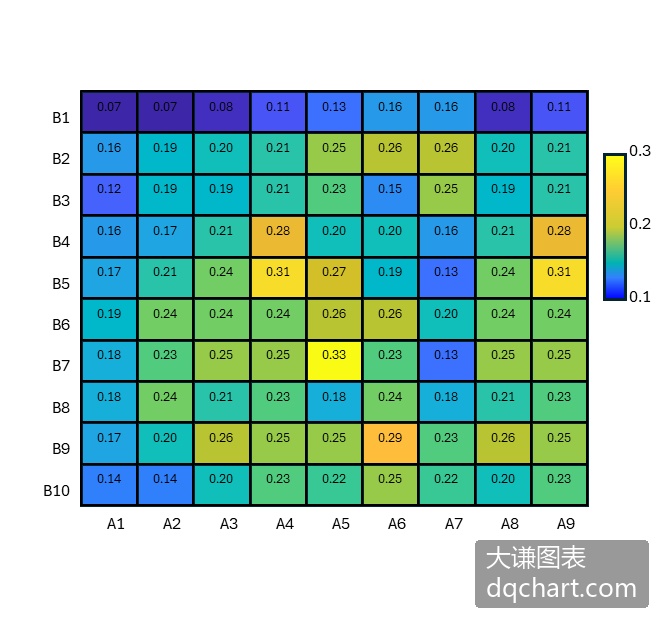
图4-30 修改热力图的颜色查找表
用Python xlwings自己编程绘制热力图,绘制网格,根据数据大小在网格中绘制相应颜色的矩形区域。本例使用了颜色查找表进行着色,相关内容请参见第4章。完整代码见:Samples->ch07 数值型图表->21 热力图->py.py。
Sub Test()
  '省略部分代码
  Dim data()
  Dim data2(1 To 9, 1 To 9) As Double
  Dim data3(1 To 9, 1 To 9) As Double
  data = ActiveSheet.Range("B2:J10").Value
  Dim minV As Double
  Dim maxV As Double
  Dim difV As Double
  minV = 1000
  maxV = -1000
  For intI = 1 To 9
    For intJ = 1 To 9
      If minV > data(intI, intJ) Then minV = data(intI, intJ)
      If maxV < data(intI, intJ) Then maxV = data(intI, intJ)
    Next
  Next
  difV = maxV - minV
  For intI = 1 To 9
    For intJ = 1 To 9
      data2(intI, intJ) = (data(intI, intJ) - minV) / difV
    Next
  Next
  For intI = 1 To 9
    For intJ = 1 To 9
      data3(intI, intJ) = data2(9 - intI + 1, intJ)
    Next
  Next
  Dim cm()
  cm = ActiveWorkbook.Sheets(2).Range("A1:C256").Value
  Dim sx1 As Double
  Dim sy1 As Double
  Dim sx2 As Double
  Dim sy2 As Double
  Dim shp1 As Shape
  Dim shp2 As Shape
  Dim shp3 As Shape
  For intI = 0 To 9
    For intJ = 0 To 9
      sx1 = ShapeX(cht, intI)
      sy1 = ShapeY(cht, 0)
      sx2 = ShapeX(cht, intI)
      sy2 = ShapeY(cht, intJ)
      Set shp1 = cht.Shapes.AddLine(sx1, sy1, sx2, sy2)
      shp1.Line.ForeColor.RGB = RGB(0, 0, 0)
      shp1.Line.Weight = 1
      sx1 = ShapeX(cht, 0)
      sy1 = ShapeY(cht, intJ)
      sx2 = ShapeX(cht, intI)
      sy2 = ShapeY(cht, intJ)
      Set shp2 = cht.Shapes.AddLine(sx1, sy1, sx2, sy2)
      shp2.Line.ForeColor.RGB = RGB(0, 0, 0)
      shp2.Line.Weight = 1
    Next
  Next
  Dim w As Double
  Dim w2 As Double
  Dim mg As Double
  Dim lf As Double
  Dim tp As Double
  Dim wd As Double
  Dim ht As Double
  Dim count As Integer
  Dim intR As Integer
  Dim intG As Integer
  Dim intB As Integer
  For intI = 1 To 9
    For intJ = 9 To 1 Step -1
      w = data3(intJ, intI)
      If Int(w * 256) = 0 Then
        count = 1
        intR = cm(1, 1)
        intG = cm(1, 2)
        intB = cm(1, 3)
      Else
        count = Int(w * 256)
        intR = cm(count, 1)
        intG = cm(count, 2)
        intB = cm(count, 3)
      End If
      lf = ShapeX(cht, intI - 1)
      tp = ShapeY(cht, intJ)
      wd = cht.PlotArea.InsideWidth / (cht.Axes(1).MaximumScale - cht.Axes(1).MinimumScale) * 1
      ht = cht.PlotArea.InsideHeight / (cht.Axes(2).MaximumScale - cht.Axes(2).MinimumScale) * 1
      Set shp3 = cht.Shapes.AddShape(msoShapeRectangle, lf, tp, wd, ht)
      shp3.Fill.ForeColor.RGB = RGB(intR, intG, intB)
    Next
  Next
  Dim shp4 As Shape
  lf = ShapeX(cht, 9.5)
  tp = ShapeY(cht, 8)
  wd = cht.PlotArea.InsideWidth / (cht.Axes(1).MaximumScale - cht.Axes(1).MinimumScale) * 0.4
  ht = cht.PlotArea.InsideHeight / (cht.Axes(2).MaximumScale - cht.Axes(2).MinimumScale) * 3
  Set shp4 = cht.Shapes.AddShape(msoShapeRectangle, lf, tp, wd, ht)
  With shp4.Fill
    .ForeColor.RGB = RGB(255, 255, 26)
    .OneColorGradient msoGradientHorizontal, 1, 1
    .GradientStops.Insert RGB(255, 0, 0), 1
    .GradientStops.Delete(2)
  End With
  Dim shp5 As Shape
  Dim cmLabelPos(1 To 3) As Double
  Dim cmLabels(1 To 3) As Double
  cmLabelPos(1) = 8.2
  cmLabelPos(2) = 6.9
  cmLabelPos(3) = 5.3
  cmLabels(1) = maxV
  cmLabels(2) = (maxV + minV) / 2
  cmLabels(3) = minV
  For intI = 1 To 3
    lf = ShapeX(cht, 10.9)
    tp = ShapeY(cht, cmLabelPos(intI))
    wd = cht.PlotArea.InsideWidth / (cht.Axes(1).MaximumScale - cht.Axes(1).MinimumScale) * 1.2
    ht = cht.PlotArea.InsideHeight / (cht.Axes(2).MaximumScale - cht.Axes(2).MinimumScale) * 0.6
    Set shp5 = cht.Shapes.AddLabel(msoTextOrientationHorizontal, lf, tp, wd, ht)
    shp5.TextFrame2.TextRange.Characters.Text = Format(CStr(cmLabels(intI)), "0.00")
    shp5.TextFrame2.TextRange.Characters.Font.Size = 8
    shp5.TextFrame2.AutoSize = msoAutoSizeTextToFitShape
  Next
  Dim shp6 As Shape
  Dim tk1LabelPos(1 To 9) As Double
  Dim tk1Labels(1 To 9) As Double
  For intI = 1 To 9
    tk1LabelPos(intI) = 9 - intI + 1
  Next
  For intI = 1 To 9
    tk1Labels(intI) = intI
  Next
  For intI = 1 To 9
    lf = ShapeX(cht, -0.6)
    tp = ShapeY(cht, tk1LabelPos(intI) - 0.2)
    wd = cht.PlotArea.InsideWidth / (cht.Axes(1).MaximumScale - cht.Axes(1).MinimumScale) * 1.5
    ht = cht.PlotArea.InsideHeight / (cht.Axes(2).MaximumScale - cht.Axes(2).MinimumScale) * 0.4
    Set shp6 = cht.Shapes.AddLabel(msoTextOrientationHorizontal, lf, tp, wd, ht)
    shp6.TextFrame2.TextRange.Characters.Text = Format(CStr(tk1Labels(intI)), "0")
    shp6.TextFrame2.TextRange.Characters.Font.Size = 8
    shp6.TextFrame2.AutoSize = msoAutoSizeTextToFitShape
  Next
  Dim shp7 As Shape
  Dim tk2LabelPos(1 To 9) As Double
  Dim tk2Labels(1 To 9) As Double
  For intI = 0 To 8
    tk2LabelPos(intI + 1) = intI
  Next
  For intI = 1 To 9
    tk2Labels(intI) = intI
  Next
  For intI = 1 To 9
    lf = ShapeX(cht, tk2LabelPos(intI) + 0.2)
    tp = ShapeY(cht, -0.07)
    wd = cht.PlotArea.InsideWidth / (cht.Axes(1).MaximumScale - cht.Axes(1).MinimumScale) * 1.5
    ht = cht.PlotArea.InsideHeight / (cht.Axes(2).MaximumScale - cht.Axes(2).MinimumScale) * 0.4
    Set shp7 = cht.Shapes.AddLabel(msoTextOrientationHorizontal, lf, tp, wd, ht)
    shp7.TextFrame2.TextRange.Characters.Text = Format(CStr(tk2Labels(intI)), "0")
    shp7.TextFrame2.TextRange.Characters.Font.Size = 8
    shp7.TextFrame2.AutoSize = msoAutoSizeTextToFitShape
  Next
  Dim shp8 As Shape
  lf = ShapeX(cht, 3.5)
  tp = ShapeY(cht, -0.5)
  wd = cht.PlotArea.InsideWidth / (cht.Axes(1).MaximumScale - cht.Axes(1).MinimumScale) * 2.5
  ht = cht.PlotArea.InsideHeight / (cht.Axes(2).MaximumScale - cht.Axes(2).MinimumScale) * 0.6
  Set shp8 = cht.Shapes.AddLabel(msoTextOrientationHorizontal, lf, tp, wd, ht)
  shp8.TextFrame2.TextRange.Characters.Text = "X Axis Label"
  shp8.TextFrame2.TextRange.Characters.Font.Size = 10
  shp8.TextFrame2.AutoSize = msoAutoSizeTextToFitShape
  Dim shp9 As Shape
  lf = ShapeX(cht, -0.9)
  tp = ShapeY(cht, 5.5)
  wd = cht.PlotArea.InsideWidth / (cht.Axes(1).MaximumScale - cht.Axes(1).MinimumScale) * 0.6
  ht = cht.PlotArea.InsideHeight / (cht.Axes(2).MaximumScale - cht.Axes(2).MinimumScale) * 2.5
  Set shp9 = cht.Shapes.AddLabel(msoTextOrientationVertical, lf, tp, wd, ht)
  shp9.TextFrame2.TextRange.Characters.Text = "Y Axis Label"
  shp9.TextFrame2.TextRange.Characters.Font.Size = 10
  shp9.TextFrame2.AutoSize = msoAutoSizeTextToFitShape
End Sub
运行代码生成类似图4-28的热力图。
圆圈热力图
图4-31所示的热力图称为圆圈热力图,它在图表的每个方框中用颜色和大小不一的圆形面表示矩阵数据的大小。
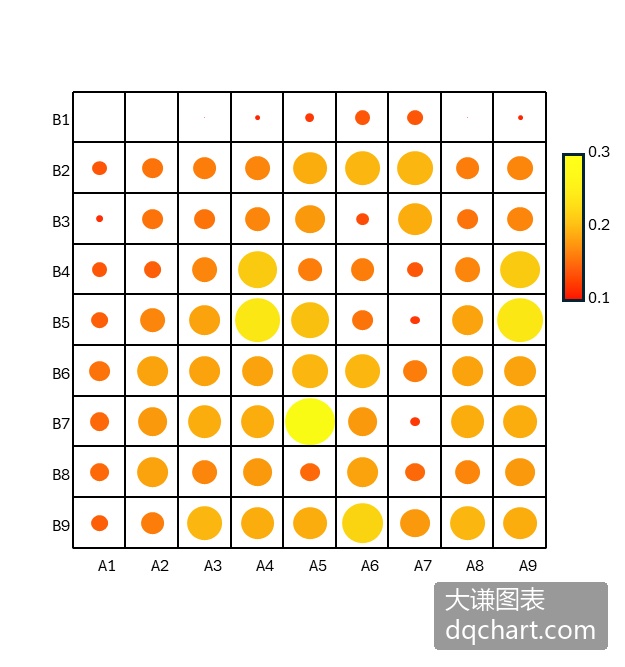
图4-31 圆圈热力图
用Python xlwings自己编程绘制圆圈热力图,绘制网格,根据数据大小在网格中绘制相应颜色和大小的圆形区域。本例使用了颜色查找表进行着色,相关内容请参见第4章。完整代码见:Samples->ch07 数值型图表->22 圆圈热力图->py.py。
Sub Test()
  '省略部分代码
  Dim data()
  Dim data2(1 To 9, 1 To 9) As Double
  Dim data3(1 To 9, 1 To 9) As Double
  data = ActiveSheet.Range("B2:J10").Value
  Dim minV As Double
  Dim maxV As Double
  Dim difV As Double
  minV = 1000
  maxV = -1000
  For intI = 1 To 9
    For intJ = 1 To 9
      If minV > data(intI, intJ) Then minV = data(intI, intJ)
      If maxV < data(intI, intJ) Then maxV = data(intI, intJ)
    Next
  Next
  difV = maxV - minV
  For intI = 1 To 9
    For intJ = 1 To 9
      data2(intI, intJ) = (data(intI, intJ) - minV) / difV
    Next
  Next
    For intI = 1 To 9
    For intJ = 1 To 9
      data3(intI, intJ) = data2(9 - intI + 1, intJ)
    Next
  Next
  Dim cm()
  cm = ActiveWorkbook.Sheets(2).Range("A1:C256").Value
  Dim sx1 As Double
  Dim sy1 As Double
  Dim sx2 As Double
  Dim sy2 As Double
  Dim shp1 As Shape
  Dim shp2 As Shape
  Dim shp3 As Shape
  For intI = 0 To 9
    For intJ = 0 To 9
      sx1 = ShapeX(cht, intI)
      sy1 = ShapeY(cht, 0)
      sx2 = ShapeX(cht, intI)
      sy2 = ShapeY(cht, intJ)
      Set shp1 = cht.Shapes.AddLine(sx1, sy1, sx2, sy2)
      shp1.Line.ForeColor.RGB = RGB(0, 0, 0)
      shp1.Line.Weight = 1
      sx1 = ShapeX(cht, 0)
      sy1 = ShapeY(cht, intJ)
      sx2 = ShapeX(cht, intI)
      sy2 = ShapeY(cht, intJ)
      Set shp2 = cht.Shapes.AddLine(sx1, sy1, sx2, sy2)
      shp2.Line.ForeColor.RGB = RGB(0, 0, 0)
      shp2.Line.Weight = 1
    Next
  Next
  Dim w As Double
  Dim w2 As Double
  Dim mg As Double
  Dim lf As Double
  Dim tp As Double
  Dim wd As Double
  Dim ht As Double
  Dim count As Integer
  Dim intR As Integer
  Dim intG As Integer
  Dim intB As Integer
  For intI = 1 To 9
    For intJ = 9 To 1 Step -1
      w = data3(intJ, intI)
      mg = (1 - w) / 2
      If Int(w * 256) = 0 Then
        count = 1
        intR = cm(1, 1)
        intG = cm(1, 2)
        intB = cm(1, 3)
      Else
        count = Int(w * 256)
        intR = cm(count, 1)
        intG = cm(count, 2)
        intB = cm(count, 3)
      End If
      lf = ShapeX(cht, intI - 1 + mg)
      tp = ShapeY(cht, intJ - mg)
      wd = cht.PlotArea.InsideWidth / (cht.Axes(1).MaximumScale - cht.Axes(1).MinimumScale) * w
      ht = cht.PlotArea.InsideHeight / (cht.Axes(2).MaximumScale - cht.Axes(2).MinimumScale) * w
      Set shp3 = cht.Shapes.AddShape(9, lf, tp, wd, ht)
      shp3.Fill.ForeColor.RGB = RGB(intR, intG, intB)
      shp3.Line.ForeColor.RGB = RGB(255, 255, 255)
    Next
  Next
  Dim shp4 As Shape
  lf = ShapeX(cht, 9.5)
  tp = ShapeY(cht, 8)
  wd = cht.PlotArea.InsideWidth / (cht.Axes(1).MaximumScale - cht.Axes(1).MinimumScale) * 0.4
  ht = cht.PlotArea.InsideHeight / (cht.Axes(2).MaximumScale - cht.Axes(2).MinimumScale) * 3
  Set shp4 = cht.Shapes.AddShape(msoShapeRectangle, lf, tp, wd, ht)
  With shp4.Fill
    .ForeColor.RGB = RGB(255, 255, 26)
    .OneColorGradient msoGradientHorizontal, 1, 1
    .GradientStops.Insert RGB(255, 0, 0), 1
    .GradientStops.Delete(2)
  End With
  Dim shp5 As Shape
  Dim cmLabelPos(1 To 3) As Double
  Dim cmLabels(1 To 3) As Double
  cmLabelPos(1) = 8.2
  cmLabelPos(2) = 6.9
  cmLabelPos(3) = 5.3
  cmLabels(1) = maxV
  cmLabels(2) = (maxV + minV) / 2
  cmLabels(3) = minV
  For intI = 1 To 3
    lf = ShapeX(cht, 10.7)
    tp = ShapeY(cht, cmLabelPos(intI))
    wd = cht.PlotArea.InsideWidth / (cht.Axes(1).MaximumScale - cht.Axes(1).MinimumScale) * 1.2
    ht = cht.PlotArea.InsideHeight / (cht.Axes(2).MaximumScale - cht.Axes(2).MinimumScale) * 0.6
    Set shp5 = cht.Shapes.AddLabel(msoTextOrientationHorizontal, lf, tp, wd, ht)
    shp5.TextFrame2.TextRange.Characters.Text = Format(CStr(cmLabels(intI)), "0.00")
    shp5.TextFrame2.TextRange.Characters.Font.Size = 8
    shp5.TextFrame2.AutoSize = msoAutoSizeTextToFitShape
  Next
  Dim shp6 As Shape
  Dim tk1LabelPos(1 To 9) As Double
  Dim tk1Labels(1 To 9) As Double
  For intI = 1 To 9
    tk1LabelPos(intI) = 9 - intI + 1
  Next
  For intI = 1 To 9
    tk1Labels(intI) = intI
  Next
  For intI = 1 To 9
    lf = ShapeX(cht, -0.6)
    tp = ShapeY(cht, tk1LabelPos(intI) - 0.2)
    wd = cht.PlotArea.InsideWidth / (cht.Axes(1).MaximumScale - cht.Axes(1).MinimumScale) * 1.5
    ht = cht.PlotArea.InsideHeight / (cht.Axes(2).MaximumScale - cht.Axes(2).MinimumScale) * 0.4
    Set shp6 = cht.Shapes.AddLabel(msoTextOrientationHorizontal, lf, tp, wd, ht)
    shp6.TextFrame2.TextRange.Characters.Text = Format(CStr(tk1Labels(intI)), "0")
    shp6.TextFrame2.TextRange.Characters.Font.Size = 8
    shp6.TextFrame2.AutoSize = msoAutoSizeTextToFitShape
  Next
  Dim shp7 As Shape
  Dim tk2LabelPos(1 To 9) As Double
  Dim tk2Labels(1 To 9) As Double
  For intI = 0 To 8
    tk2LabelPos(intI + 1) = intI
  Next
  For intI = 1 To 9
    tk2Labels(intI) = intI
  Next
  For intI = 1 To 9
    lf = ShapeX(cht, tk2LabelPos(intI) + 0.2)
    tp = ShapeY(cht, -0.07)
    wd = cht.PlotArea.InsideWidth / (cht.Axes(1).MaximumScale - cht.Axes(1).MinimumScale) * 1.5
    ht = cht.PlotArea.InsideHeight / (cht.Axes(2).MaximumScale - cht.Axes(2).MinimumScale) * 0.4
    Set shp7 = cht.Shapes.AddLabel(msoTextOrientationHorizontal, lf, tp, wd, ht)
    shp7.TextFrame2.TextRange.Characters.Text = Format(CStr(tk2Labels(intI)), "0")
    shp7.TextFrame2.TextRange.Characters.Font.Size = 8
    shp7.TextFrame2.AutoSize = msoAutoSizeTextToFitShape
  Next
  Dim shp8 As Shape
  lf = ShapeX(cht, 3.5)
  tp = ShapeY(cht, -0.5)
  wd = cht.PlotArea.InsideWidth / (cht.Axes(1).MaximumScale - cht.Axes(1).MinimumScale) * 2.5
  ht = cht.PlotArea.InsideHeight / (cht.Axes(2).MaximumScale - cht.Axes(2).MinimumScale) * 0.6
  Set shp8 = cht.Shapes.AddLabel(msoTextOrientationHorizontal, lf, tp, wd, ht)
  shp8.TextFrame2.TextRange.Characters.Text = "X Axis Label"
  shp8.TextFrame2.TextRange.Characters.Font.Size = 10
  shp8.TextFrame2.AutoSize = msoAutoSizeTextToFitShape
  Dim shp9 As Shape
  lf = ShapeX(cht, -0.9)
  tp = ShapeY(cht, 5.5)
  wd = cht.PlotArea.InsideWidth / (cht.Axes(1).MaximumScale - cht.Axes(1).MinimumScale) * 0.6
  ht = cht.PlotArea.InsideHeight / (cht.Axes(2).MaximumScale - cht.Axes(2).MinimumScale) * 2.5
  Set shp9 = cht.Shapes.AddLabel(msoTextOrientationVertical, lf, tp, wd, ht)
  shp9.TextFrame2.TextRange.Characters.Text = "Y Axis Label"
  shp9.TextFrame2.TextRange.Characters.Font.Size = 10
  shp9.TextFrame2.AutoSize = msoAutoSizeTextToFitShape
End Sub
运行代码生成类似图4-31的圆圈热力图。
方块热力图
图4-32所示的热力图称为方块热力图,它在图表的每个方框中用颜色和大小不一的正方形面表示矩阵数据的大小。
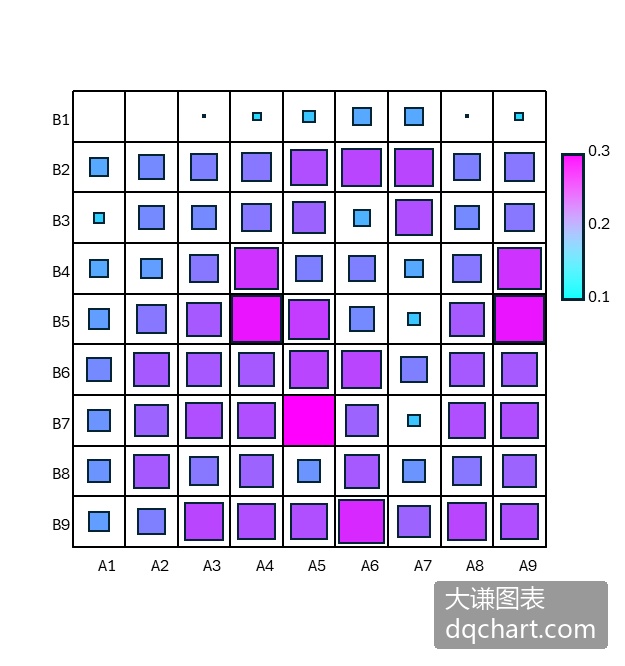
图4-32 方块热力图
用Python xlwings自己编程绘制方块热力图,绘制网格,根据数据大小在网格中绘制相应颜色和大小的矩形区域。本例使用了颜色查找表进行着色,相关内容请参见第4章。完整代码见:Samples->ch07 数值型图表->23 方块热力图->py.py。
Sub Test()
  '省略部分代码
  Dim data()
  Dim data2(1 To 9, 1 To 9) As Double
  Dim data3(1 To 9, 1 To 9) As Double
  data = ActiveSheet.Range("B2:J10").Value
  Dim minV As Double
  Dim maxV As Double
  Dim difV As Double
  minV = 1000
  maxV = -1000
  For intI = 1 To 9
    For intJ = 1 To 9
      If minV > data(intI, intJ) Then minV = data(intI, intJ)
      If maxV < data(intI, intJ) Then maxV = data(intI, intJ)
    Next
  Next
  difV = maxV - minV
  For intI = 1 To 9
    For intJ = 1 To 9
      data2(intI, intJ) = (data(intI, intJ) - minV) / difV
    Next
  Next
    For intI = 1 To 9
    For intJ = 1 To 9
      data3(intI, intJ) = data2(9 - intI + 1, intJ)
    Next
  Next
  Dim cm()
  cm = ActiveWorkbook.Sheets(2).Range("A1:C256").Value
  Dim sx1 As Double
  Dim sy1 As Double
  Dim sx2 As Double
  Dim sy2 As Double
  Dim shp1 As Shape
  Dim shp2 As Shape
  Dim shp3 As Shape
  For intI = 0 To 9
    For intJ = 0 To 9
      sx1 = ShapeX(cht, intI)
      sy1 = ShapeY(cht, 0)
      sx2 = ShapeX(cht, intI)
      sy2 = ShapeY(cht, intJ)
      Set shp1 = cht.Shapes.AddLine(sx1, sy1, sx2, sy2)
      shp1.Line.ForeColor.RGB = RGB(0, 0, 0)
      shp1.Line.Weight = 1
      sx1 = ShapeX(cht, 0)
      sy1 = ShapeY(cht, intJ)
      sx2 = ShapeX(cht, intI)
      sy2 = ShapeY(cht, intJ)
      Set shp2 = cht.Shapes.AddLine(sx1, sy1, sx2, sy2)
      shp2.Line.ForeColor.RGB = RGB(0, 0, 0)
      shp2.Line.Weight = 1
    Next
  Next
  Dim w As Double
  Dim w2 As Double
  Dim mg As Double
  Dim lf As Double
  Dim tp As Double
  Dim wd As Double
  Dim ht As Double
  Dim count As Integer
  Dim intR As Integer
  Dim intG As Integer
  Dim intB As Integer
  For intI = 1 To 9
    For intJ = 9 To 1 Step -1
      w = data3(intJ, intI)
      mg = (1 - w) / 2
      If Int(w * 256) = 0 Then
        count = 1
        intR = cm(1, 1)
        intG = cm(1, 2)
        intB = cm(1, 3)
      Else
        count = Int(w * 256)
        intR = cm(count, 1)
        intG = cm(count, 2)
        intB = cm(count, 3)
      End If
      lf = ShapeX(cht, intI - 1 + mg)
      tp = ShapeY(cht, intJ - mg)
      wd = cht.PlotArea.InsideWidth / (cht.Axes(1).MaximumScale - cht.Axes(1).MinimumScale) * w
      ht = cht.PlotArea.InsideHeight / (cht.Axes(2).MaximumScale - cht.Axes(2).MinimumScale) * w
      Set shp3 = cht.Shapes.AddShape(msoShapeRectangle, lf, tp, wd, ht)
      shp3.Fill.ForeColor.RGB = RGB(intR, intG, intB)
      'shp3.Line.ForeColor.RGB = RGB(255, 255, 255)
      shp3.Line.Weight = 1
    Next
  Next
  Dim shp4 As Shape
  lf = ShapeX(cht, 9.5)
  tp = ShapeY(cht, 8)
  wd = cht.PlotArea.InsideWidth / (cht.Axes(1).MaximumScale - cht.Axes(1).MinimumScale) * 0.4
  ht = cht.PlotArea.InsideHeight / (cht.Axes(2).MaximumScale - cht.Axes(2).MinimumScale) * 3
  Set shp4 = cht.Shapes.AddShape(msoShapeRectangle, lf, tp, wd, ht)
  With shp4.Fill
    .ForeColor.RGB = RGB(255, 255, 26)
    .OneColorGradient msoGradientHorizontal, 1, 1
    .GradientStops.Insert RGB(255, 0, 0), 1
    .GradientStops.Delete(2)
  End With
  Dim shp5 As Shape
  Dim cmLabelPos(1 To 3) As Double
  Dim cmLabels(1 To 3) As Double
  cmLabelPos(1) = 8.2
  cmLabelPos(2) = 6.9
  cmLabelPos(3) = 5.3
  cmLabels(1) = maxV
  cmLabels(2) = (maxV + minV) / 2
  cmLabels(3) = minV
  For intI = 1 To 3
    lf = ShapeX(cht, 10.7)
    tp = ShapeY(cht, cmLabelPos(intI))
    wd = cht.PlotArea.InsideWidth / (cht.Axes(1).MaximumScale - cht.Axes(1).MinimumScale) * 1.2
    ht = cht.PlotArea.InsideHeight / (cht.Axes(2).MaximumScale - cht.Axes(2).MinimumScale) * 0.6
    Set shp5 = cht.Shapes.AddLabel(msoTextOrientationHorizontal, lf, tp, wd, ht)
    shp5.TextFrame2.TextRange.Characters.Text = Format(CStr(cmLabels(intI)), "0.00")
    shp5.TextFrame2.TextRange.Characters.Font.Size = 8
    shp5.TextFrame2.AutoSize = msoAutoSizeTextToFitShape
  Next
  Dim shp6 As Shape
  Dim tk1LabelPos(1 To 9) As Double
  Dim tk1Labels(1 To 9) As Double
  For intI = 1 To 9
    tk1LabelPos(intI) = 9 - intI + 1
  Next
  For intI = 1 To 9
    tk1Labels(intI) = intI
  Next
  For intI = 1 To 9
    lf = ShapeX(cht, -0.6)
    tp = ShapeY(cht, tk1LabelPos(intI) - 0.2)
    wd = cht.PlotArea.InsideWidth / (cht.Axes(1).MaximumScale - cht.Axes(1).MinimumScale) * 1.5
    ht = cht.PlotArea.InsideHeight / (cht.Axes(2).MaximumScale - cht.Axes(2).MinimumScale) * 0.4
    Set shp6 = cht.Shapes.AddLabel(msoTextOrientationHorizontal, lf, tp, wd, ht)
    shp6.TextFrame2.TextRange.Characters.Text = Format(CStr(tk1Labels(intI)), "0")
    shp6.TextFrame2.TextRange.Characters.Font.Size = 8
    shp6.TextFrame2.AutoSize = msoAutoSizeTextToFitShape
  Next
  Dim shp7 As Shape
  Dim tk2LabelPos(1 To 9) As Double
  Dim tk2Labels(1 To 9) As Double
  For intI = 0 To 8
    tk2LabelPos(intI + 1) = intI
  Next
  For intI = 1 To 9
    tk2Labels(intI) = intI
  Next
  For intI = 1 To 9
    lf = ShapeX(cht, tk2LabelPos(intI) + 0.2)
    tp = ShapeY(cht, -0.07)
    wd = cht.PlotArea.InsideWidth / (cht.Axes(1).MaximumScale - cht.Axes(1).MinimumScale) * 1.5
    ht = cht.PlotArea.InsideHeight / (cht.Axes(2).MaximumScale - cht.Axes(2).MinimumScale) * 0.4
    Set shp7 = cht.Shapes.AddLabel(msoTextOrientationHorizontal, lf, tp, wd, ht)
    shp7.TextFrame2.TextRange.Characters.Text = Format(CStr(tk2Labels(intI)), "0")
    shp7.TextFrame2.TextRange.Characters.Font.Size = 8
    shp7.TextFrame2.AutoSize = msoAutoSizeTextToFitShape
  Next
  Dim shp8 As Shape
  lf = ShapeX(cht, 3.5)
  tp = ShapeY(cht, -0.5)
  wd = cht.PlotArea.InsideWidth / (cht.Axes(1).MaximumScale - cht.Axes(1).MinimumScale) * 2.5
  ht = cht.PlotArea.InsideHeight / (cht.Axes(2).MaximumScale - cht.Axes(2).MinimumScale) * 0.6
  Set shp8 = cht.Shapes.AddLabel(msoTextOrientationHorizontal, lf, tp, wd, ht)
  shp8.TextFrame2.TextRange.Characters.Text = "X Axis Label"
  shp8.TextFrame2.TextRange.Characters.Font.Size = 10
  shp8.TextFrame2.AutoSize = msoAutoSizeTextToFitShape
  Dim shp9 As Shape
  lf = ShapeX(cht, -0.9)
  tp = ShapeY(cht, 5.5)
  wd = cht.PlotArea.InsideWidth / (cht.Axes(1).MaximumScale - cht.Axes(1).MinimumScale) * 0.6
  ht = cht.PlotArea.InsideHeight / (cht.Axes(2).MaximumScale - cht.Axes(2).MinimumScale) * 2.5
  Set shp9 = cht.Shapes.AddLabel(msoTextOrientationVertical, lf, tp, wd, ht)
  shp9.TextFrame2.TextRange.Characters.Text = "Y Axis Label"
  shp9.TextFrame2.TextRange.Characters.Font.Size = 10
  shp9.TextFrame2.AutoSize = msoAutoSizeTextToFitShape
End Sub
运行代码生成类似图4-32的方块热力图。
三角形方块热力图
对称矩阵关于对角线对称,上三角的数据和下三角的数据完全相同,所以绘图时常常只绘一半,要么是上三角,要么是下三角。图4-33中绘制下三角矩阵对应的三角形方块热力图。
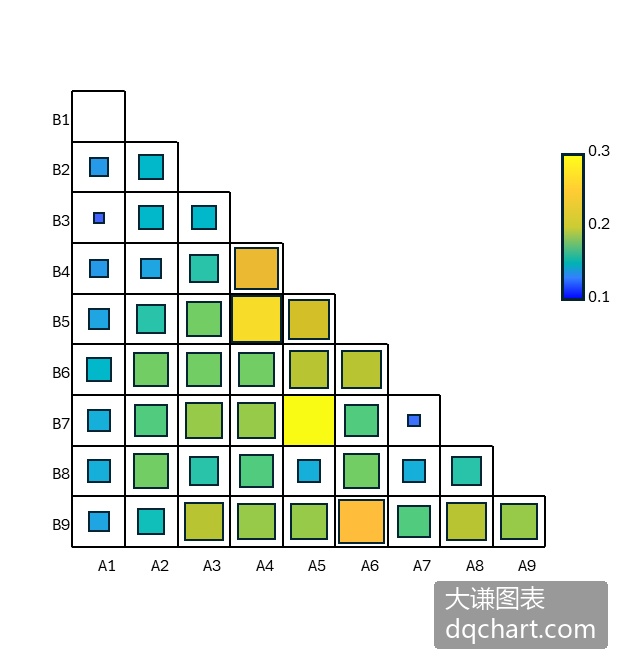
图4-33 三角形方块热力图
用Python xlwings自己编程绘制三角形方块热力图,绘制网格,根据数据大小在网格中绘制相应颜色和大小的矩形区域。本例使用了颜色查找表进行着色,相关内容请参见第4章。完整代码见:Samples->ch07 数值型图表->24 三角形方块热力图->py.py。
Sub Test()
  '省略部分代码
  Dim data()
  Dim data2(1 To 9, 1 To 9) As Double
  Dim data3(1 To 9, 1 To 9) As Double
  data = ActiveSheet.Range("B2:J10").Value
  Dim minV As Double
  Dim maxV As Double
  Dim difV As Double
  minV = 1000
  maxV = -1000
  For intI = 1 To 9
    For intJ = 1 To 9
      If minV > data(intI, intJ) Then minV = data(intI, intJ)
      If maxV < data(intI, intJ) Then maxV = data(intI, intJ)
    Next
  Next
  difV = maxV - minV
  For intI = 1 To 9
    For intJ = 1 To 9
      data2(intI, intJ) = (data(intI, intJ) - minV) / difV
    Next
  Next
    For intI = 1 To 9
    For intJ = 1 To 9
      data3(intI, intJ) = data2(9 - intI + 1, intJ)
    Next
  Next
  Dim cm()
  cm = ActiveWorkbook.Sheets(2).Range("A1:C256").Value
  Dim sx1 As Double
  Dim sy1 As Double
  Dim sx2 As Double
  Dim sy2 As Double
  Dim shp1 As Shape
  Dim shp2 As Shape
  Dim shp3 As Shape
  sx1 = ShapeX(cht, 0)
  sy1 = ShapeY(cht, 0)
  sx2 = ShapeX(cht, 0)
  sy2 = ShapeY(cht, 9)
  Set shp1 = cht.Shapes.AddLine(sx1, sy1, sx2, sy2)
  shp1.Line.ForeColor.RGB = RGB(0, 0, 0)
  shp1.Line.Weight = 1
  For intI = 1 To 9
    For intJ = 9 - intI + 1 To 0 Step -1
      sx1 = ShapeX(cht, intI)
      sy1 = ShapeY(cht, 0)
      sx2 = ShapeX(cht, intI)
      sy2 = ShapeY(cht, intJ)
      Set shp1 = cht.Shapes.AddLine(sx1, sy1, sx2, sy2)
      shp1.Line.ForeColor.RGB = RGB(0, 0, 0)
      shp1.Line.Weight = 1
      sx1 = ShapeX(cht, 0)
      sy1 = ShapeY(cht, intJ)
      sx2 = ShapeX(cht, intI)
      sy2 = ShapeY(cht, intJ)
      Set shp2 = cht.Shapes.AddLine(sx1, sy1, sx2, sy2)
      shp2.Line.ForeColor.RGB = RGB(0, 0, 0)
      shp2.Line.Weight = 1
    Next
  Next
  Dim w As Double
  Dim w2 As Double
  Dim mg As Double
  Dim lf As Double
  Dim tp As Double
  Dim wd As Double
  Dim ht As Double
  Dim count As Integer
  Dim intR As Integer
  Dim intG As Integer
  Dim intB As Integer
  For intI = 1 To 9
    For intJ = 9 - intI + 1 To 1 Step -1
      w = data3(intJ, intI)
      mg = (1 - w) / 2
      If Int(w * 256) = 0 Then
        count = 1
        intR = cm(1, 1)
        intG = cm(1, 2)
        intB = cm(1, 3)
      Else
        count = Int(w * 256)
        intR = cm(count, 1)
        intG = cm(count, 2)
        intB = cm(count, 3)
      End If
      lf = ShapeX(cht, intI - 1 + mg)
      tp = ShapeY(cht, intJ - mg)
      wd = cht.PlotArea.InsideWidth / (cht.Axes(1).MaximumScale - cht.Axes(1).MinimumScale) * w
      ht = cht.PlotArea.InsideHeight / (cht.Axes(2).MaximumScale - cht.Axes(2).MinimumScale) * w
      Set shp3 = cht.Shapes.AddShape(msoShapeRectangle, lf, tp, wd, ht)
      shp3.Fill.ForeColor.RGB = RGB(intR, intG, intB)
      'shp3.Line.ForeColor.RGB = RGB(255, 255, 255)
      shp3.Line.Weight = 1
    Next
  Next
  Dim shp4 As Shape
  lf = ShapeX(cht, 9.3)
  tp = ShapeY(cht, 8)
  wd = cht.PlotArea.InsideWidth / (cht.Axes(1).MaximumScale - cht.Axes(1).MinimumScale) * 0.4
  ht = cht.PlotArea.InsideHeight / (cht.Axes(2).MaximumScale - cht.Axes(2).MinimumScale) * 3
  Set shp4 = cht.Shapes.AddShape(msoShapeRectangle, lf, tp, wd, ht)
  With shp4.Fill
    .ForeColor.RGB = RGB(255, 255, 26)
    .OneColorGradient msoGradientHorizontal, 1, 1
    .GradientStops.Insert RGB(255, 0, 0), 1
    .GradientStops.Delete(2)
  End With
  Dim shp5 As Shape
  Dim cmLabelPos(1 To 3) As Double
  Dim cmLabels(1 To 3) As Double
  cmLabelPos(1) = 8.2
  cmLabelPos(2) = 6.9
  cmLabelPos(3) = 5.3
  cmLabels(1) = maxV
  cmLabels(2) = (maxV + minV) / 2
  cmLabels(3) = minV
  For intI = 1 To 3
    lf = ShapeX(cht, 10.7)
    tp = ShapeY(cht, cmLabelPos(intI))
    wd = cht.PlotArea.InsideWidth / (cht.Axes(1).MaximumScale - cht.Axes(1).MinimumScale) * 1.4
    ht = cht.PlotArea.InsideHeight / (cht.Axes(2).MaximumScale - cht.Axes(2).MinimumScale) * 0.6
    Set shp5 = cht.Shapes.AddLabel(msoTextOrientationHorizontal, lf, tp, wd, ht)
    shp5.TextFrame2.TextRange.Characters.Text = Format(CStr(cmLabels(intI)), "0.00")
    shp5.TextFrame2.TextRange.Characters.Font.Size = 8
    shp5.TextFrame2.AutoSize = msoAutoSizeTextToFitShape
  Next
  Dim shp6 As Shape
  Dim tk1LabelPos(1 To 9) As Double
  Dim tk1Labels(1 To 9) As Double
  For intI = 1 To 9
    tk1LabelPos(intI) = 9 - intI + 1
  Next
  For intI = 1 To 9
    tk1Labels(intI) = intI
  Next
  For intI = 1 To 9
    lf = ShapeX(cht, -0.6)
    tp = ShapeY(cht, tk1LabelPos(intI) - 0.2)
    wd = cht.PlotArea.InsideWidth / (cht.Axes(1).MaximumScale - cht.Axes(1).MinimumScale) * 1.5
    ht = cht.PlotArea.InsideHeight / (cht.Axes(2).MaximumScale - cht.Axes(2).MinimumScale) * 0.4
    Set shp6 = cht.Shapes.AddLabel(msoTextOrientationHorizontal, lf, tp, wd, ht)
    shp6.TextFrame2.TextRange.Characters.Text = Format(CStr(tk1Labels(intI)), "0")
    shp6.TextFrame2.TextRange.Characters.Font.Size = 8
    shp6.TextFrame2.AutoSize = msoAutoSizeTextToFitShape
  Next
  Dim shp7 As Shape
  Dim tk2LabelPos(1 To 9) As Double
  Dim tk2Labels(1 To 9) As Double
  For intI = 0 To 8
    tk2LabelPos(intI + 1) = intI
  Next
  For intI = 1 To 9
    tk2Labels(intI) = intI
  Next
  For intI = 1 To 9
    lf = ShapeX(cht, tk2LabelPos(intI) + 0.2)
    tp = ShapeY(cht, -0.07)
    wd = cht.PlotArea.InsideWidth / (cht.Axes(1).MaximumScale - cht.Axes(1).MinimumScale) * 1.5
    ht = cht.PlotArea.InsideHeight / (cht.Axes(2).MaximumScale - cht.Axes(2).MinimumScale) * 0.4
    Set shp7 = cht.Shapes.AddLabel(msoTextOrientationHorizontal, lf, tp, wd, ht)
    shp7.TextFrame2.TextRange.Characters.Text = Format(CStr(tk2Labels(intI)), "0")
    shp7.TextFrame2.TextRange.Characters.Font.Size = 8
    shp7.TextFrame2.AutoSize = msoAutoSizeTextToFitShape
  Next
  Dim shp8 As Shape
  lf = ShapeX(cht, 3.5)
  tp = ShapeY(cht, -0.5)
  wd = cht.PlotArea.InsideWidth / (cht.Axes(1).MaximumScale - cht.Axes(1).MinimumScale) * 2.5
  ht = cht.PlotArea.InsideHeight / (cht.Axes(2).MaximumScale - cht.Axes(2).MinimumScale) * 0.6
  Set shp8 = cht.Shapes.AddLabel(msoTextOrientationHorizontal, lf, tp, wd, ht)
  shp8.TextFrame2.TextRange.Characters.Text = "X Axis Label"
  shp8.TextFrame2.TextRange.Characters.Font.Size = 10
  shp8.TextFrame2.AutoSize = msoAutoSizeTextToFitShape
  Dim shp9 As Shape
  lf = ShapeX(cht, -0.9)
  tp = ShapeY(cht, 5.5)
  wd = cht.PlotArea.InsideWidth / (cht.Axes(1).MaximumScale - cht.Axes(1).MinimumScale) * 0.6
  ht = cht.PlotArea.InsideHeight / (cht.Axes(2).MaximumScale - cht.Axes(2).MinimumScale) * 2.5
  Set shp9 = cht.Shapes.AddLabel(msoTextOrientationVertical, lf, tp, wd, ht)
  shp9.TextFrame2.TextRange.Characters.Text = "Y Axis Label"
  shp9.TextFrame2.TextRange.Characters.Font.Size = 10
  shp9.TextFrame2.AutoSize = msoAutoSizeTextToFitShape
End Sub
运行代码生成类似图4-33的三角形方块热力图。[大谦Excel,dqexcel点com]